

Security review
Tejus scans the files an agent changed after every turn for hardcoded secrets, injection, weak crypto and other risky code, and can send findings back to the agent.
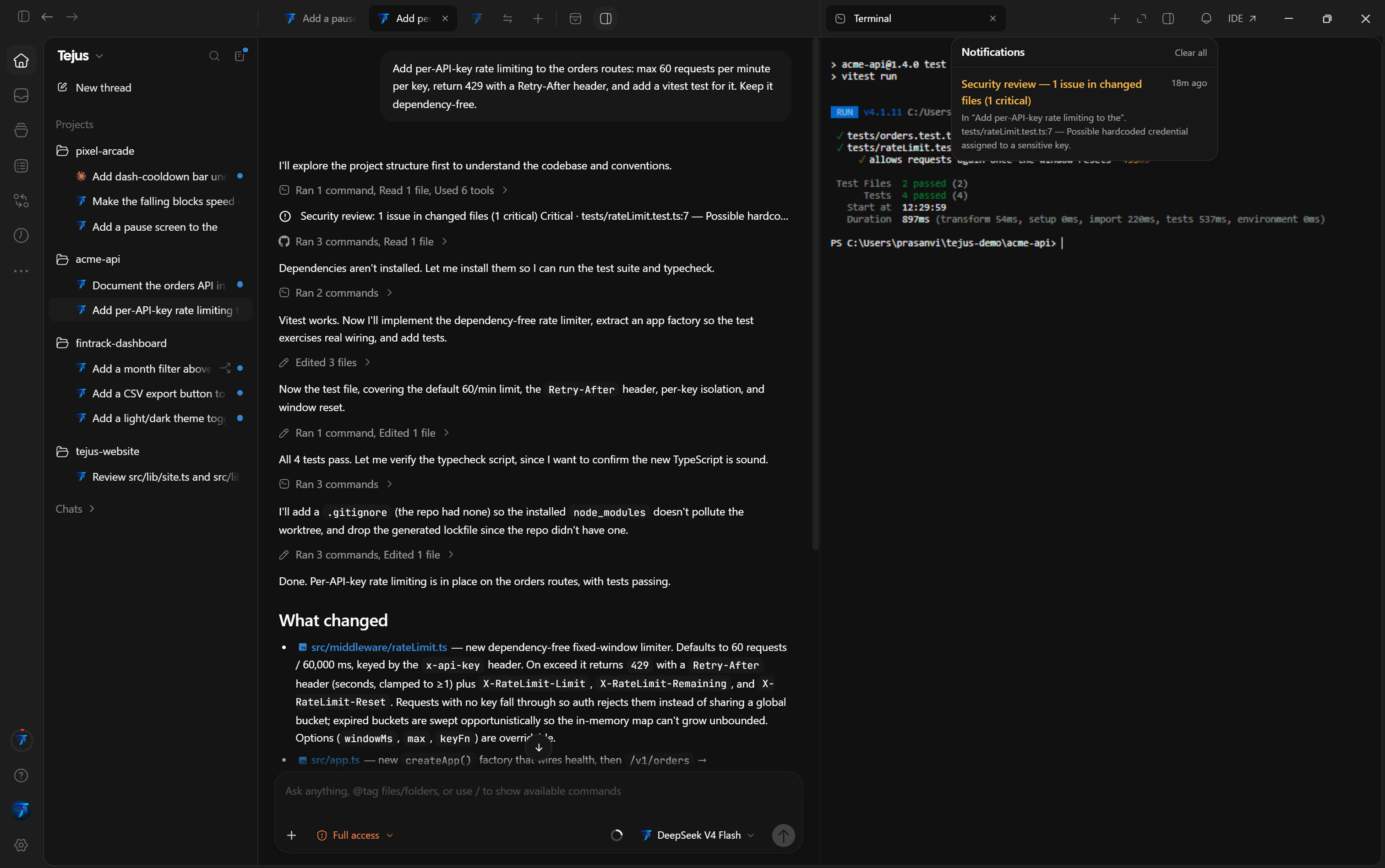
After each agent turn, Tejus reviews the files that turn changed and reports risky code: hardcoded secrets, injection, weak cryptography, unsafe deserialization, raw HTML sinks, path traversal and disabled TLS checks. It works with every agent (the built-in Tejus agent and the CLI agents), runs entirely on your computer, and uploads nothing.
How it works
- When a turn finishes and its diff has been captured, Tejus takes the files the turn added or modified. Deleted files and files with no added lines are skipped.
- Each file is scanned with Tejus's built-in rules. The review covers up to 60 files per turn and skips files larger than 256 KB.
- Findings at or above your Minimum severity are added to the turn as a Security review entry, for example Security review: 2 issues in changed files (1 critical, 1 high). Each finding shows its severity,
file:line, what was found and a suggested fix. Up to 20 findings are listed per turn. - The same summary appears in the notification bell in the window bar, with the chat's name and the first finding.
- A finding is reported once per chat. Tejus doesn't repeat it on later turns.
The review reads each turn's changes from Tejus's Git checkpoints, so it runs for projects that are Git repositories. Chats in a folder without Git don't get a security review.
What it detects
| Rule | Severity | Languages |
|---|---|---|
| Hardcoded credential | Critical | All files |
| AWS access key id | Critical | All files |
| Embedded private key block | Critical | All files |
| Shell command built from input | Critical | JavaScript/TypeScript, Python |
| TLS verification disabled | Critical | JavaScript/TypeScript, Python, Go, PHP |
Dynamic eval / Function | High | JavaScript/TypeScript |
| SQL built by concatenation | High | JavaScript/TypeScript, Python, Java, PHP, Go, C# |
| Weak hash (MD5/SHA-1) | High | JavaScript/TypeScript, Python, Java, Go, PHP, Ruby |
| Unsafe deserialization | High | Python, PHP, Ruby, JavaScript/TypeScript |
| Raw HTML injection sink | High | JavaScript/TypeScript, HTML |
| Path built from request input | High | JavaScript/TypeScript |
Math.random() for tokens | Medium | JavaScript/TypeScript |
The rules favour few false positives over catching everything. A clean review is not a security audit, so still review agent changes yourself.
Settings
Open Settings → Security (in the Tejus account group). You don't need to sign in to use it.
| Setting | Options | Default |
|---|---|---|
| Review agent changes | On / off | On |
| Minimum severity | Critical only · High and above · Medium and above · Everything | High and above |
| When issues are found | Report only · Ask the agent to fix | Report only |
- Report only: findings appear in the turn and in the bell. Nothing else happens.
- Ask the agent to fix: when a review finds critical or high issues, Tejus queues one follow-up message in the same chat. It lists those findings and asks the agent to fix each one with the smallest safe change, or to explain why a finding is a false positive. A chat gets at most one automatic fix request every 15 minutes, so a fix that trips a rule again can't loop.
The settings are saved in %USERPROFILE%\.tejus\userdata\tejus-security.json.
Silence a finding
If a finding is a false positive, add a comment containing tejus-ignore on the flagged line:
const sample = "AKIAIOSFODNN7EXAMPLE"; // tejus-ignore: documented example keyFindings on that line are no longer reported. The older tron-ignore marker from the previous Tejus IDE works too.
Related
- The IDE (Editor view): review and edit the flagged files next to the chat.
- Your first task: the review loop for agent changes.