

Tejus Cloud
Use the built-in Tejus agent with free daily Tejus Cloud tokens after Google sign-in, or with your own API keys, and track your usage.
Tejus is the agent built into the app. It needs no CLI install: it runs either on Tejus Cloud (hosted models with a free daily allowance after you sign in with Google) or on your own API keys from providers such as OpenAI, Anthropic, or Google. You can use both side by side with the CLI agents (Claude Code, Codex, and the others in Provider guides).
What you get
| Option | Needs | Billed by | Counts against the free allowance |
|---|---|---|---|
| Tejus Cloud models | Google sign-in and an activated account | Free (daily allowance) | Yes |
| Your API keys | A key saved in Settings → Your API keys | Your provider account | No |
| CLI agents | The provider's own CLI and sign-in | That provider | No |
Sign in with Google
Start sign-in
Open Settings → Account (under Tejus account) and click Sign in with Google. The welcome tour offers the same button, and so does the account button in the sidebar while you are signed out.
Approve in your browser
Tejus opens Google sign-in in your default browser and waits ("Waiting for Google…"). After you approve, the browser hands the result back to Tejus through a one-time listener on 127.0.0.1, and the page says Signed in to Tejus; close the tab and return to the app. Click Cancel in Tejus to abandon a sign-in you didn't finish.
Activate your account
New accounts get an activation e-mail. Open the link in it, then click I've clicked it — refresh in Tejus. Until the account is activated, Tejus Cloud models are locked; your own API keys and CLI agents already work. Resend e-mail sends a new link (with a short cooldown).
Your session is kept in Tejus's local secret store and refreshed automatically. Sign out is at the bottom of Settings → Account.
Free daily tokens
Every signed-in, activated account gets a free daily allowance of hosted tokens (1M tokens a day on the free plan at the time of writing). The exact limit comes from your plan and is shown in the app:
- Settings → Account → Plan: your plan, Cloud tokens today (used / limit) and when it Resets.
- Settings → Plan & Usage: the same allowance as a bar that turns amber at 80% and red at 100%, with a Refresh button.
The allowance renews a day after your period starts, so it is a rolling day rather than midnight; Tejus shows the reset time in IST. When it runs out, Tejus Cloud turns stop with Daily free limit reached, the reset time and a suggestion to add your own key. Your own API keys and CLI agents are not affected.
Turns on your own API keys and turns with CLI agents such as Claude Code or Codex never count against the free Tejus Cloud allowance.
Choose a model
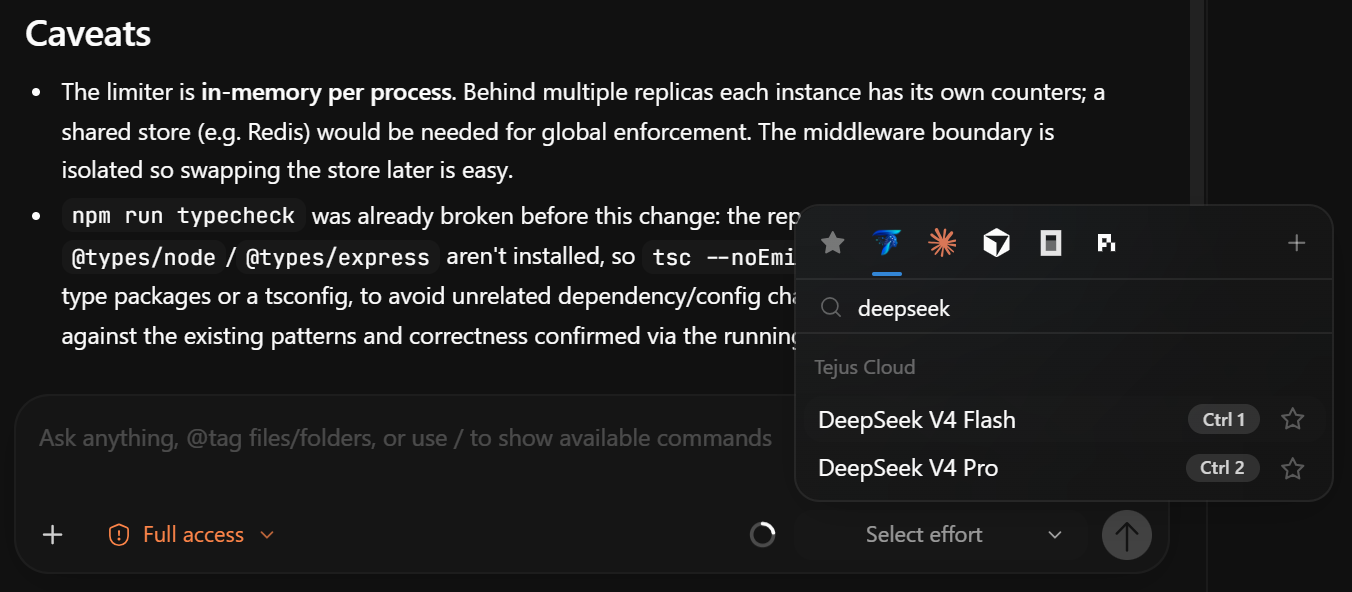
Pick Tejus in the provider list of the model picker (Ctrl+Shift+M). Its Tejus tab lists:
- Tejus Cloud models: the hosted models currently being served. The list is managed by Tejus and updates while the app runs. Settings → Plan & Usage → Included with your account shows the current list. A model can be paused or retired. If it is, Tejus asks you to pick another cloud model or use your own key.
- Models from your own keys: for every key you add, the models that provider offers.
Tejus Cloud models are text-only. To send images, use a model on your own key or a CLI agent.
Your API keys (bring your own key)
Open Settings → Your API keys and paste a key for any of these providers:
| Provider | Key looks like |
|---|---|
| OpenAI | sk-… |
| Anthropic | sk-ant-… |
| Google Gemini | AIza… |
| DeepSeek | sk-… |
| xAI Grok | xai-… |
| Mistral | provider key |
| Groq | gsk_… |
| Cerebras | csk-… |
| Moonshot (Kimi) | sk-… |
| OpenRouter | sk-or-… |
How keys behave:
- Keys are stored in Windows Credential Manager, not in Tejus's database. The settings page only shows whether a key is saved and its last four characters.
- Requests on your keys go directly to that provider and are billed to your provider account. They don't go through Tejus Cloud and don't need a Tejus sign-in.
- Replace swaps a saved key and Remove deletes it. Changes take effect immediately, including in chats that are already open.
Usage
Settings → Plan & Usage shows:
- Utilization: today's hosted pool (used / limit, percentage, reset time).
- Usage by pool: tokens and requests over the last 7 or 30 days, split into Tejus Cloud (free hosted models) and Your API keys (billed by your provider), with your top models.
- Your activity and Provider limits: links to your local stats (Profile) and to the subscription limits of your CLI agents (Usage & limits,
Ctrl+Shift+U).
When you are signed in, token counts for Tejus agent turns on your own keys (provider, model and token numbers; never prompts or code) are added to your account so this view can show them. Tejus Cloud turns are counted by the service itself. While you are signed out, nothing is uploaded.
Account notifications
The bell in the window bar collects account events: activation, plan or limit changes, quota adjustments, and cloud models that were added, paused or removed. It also shows app updates and security review findings.
Troubleshooting
| Message or symptom | What to do |
|---|---|
| "Sign in to Tejus (Settings → Account) …" | You picked a Tejus Cloud model while signed out. Sign in, or choose a model from your own key. |
| "Activate your Tejus account first …" | Open the activation e-mail, then I've clicked it — refresh. Use Resend e-mail if it didn't arrive. |
| "Daily free limit reached …" | Wait for the reset time shown, or switch to your own key or a CLI agent. |
| "… is no longer offered on Tejus Cloud" / "temporarily off" | Pick another model in the Tejus tab of the model picker. |
| "Your Tejus account is suspended" (or banned) | Tejus Cloud is disabled for the account. Your own keys and CLI agents keep working. Contact support@tejusai.com. |
| Sign-in never returns to Tejus | Finish the Google page in the same browser, keep Tejus running, and retry. Cancel resets the attempt. |
| A saved key's models don't appear | Check the key in Settings → Your API keys, then reopen the model picker. |
For problems with other agents, see Provider troubleshooting.